
Poweramp Music Player
Poweramp Software Design (Max MP)Music & Audio
4.171.91K Reviews
- Version
- build-1025-bundle-play
- Installs
- 50.00M
- Age Rating
- Everyone
Screenshots

Our Review of Poweramp Music Player
 Analysis by Appyee
I often judge a music player by what happens when someone else picks up my phone: can they find their music without changing my carefully adjusted sound? That shared-device test is where Poweramp Music Player feels most useful as a focused player for music stored on an Android device. It is made by Poweramp Software Design (Max MP), and its appeal is less about managing a household account than about giving each listener a capable way to browse and shape playback on the device they are using.
One phone, different listening habits
Picture a family car ride: one person wants a quiet playlist, another takes over for an album, and a third reaches for the equalizer because their headphones sound different. Poweramp can suit that kind of handoff because the library, playback controls, and sound adjustments are close at hand. I would still agree on who changes settings before passing the phone around; a carefully tuned profile can be changed by the next listener, and the app should not be treated as separate personal spaces for different people.
That distinction matters. A music player can make shared listening convenient, but it does not replace separate device accounts or solve ownership and privacy boundaries. If several people use one phone, I would keep personal playlists and device access in mind rather than assuming that a player itself isolates everyone’s activity. For a shared tablet or household phone used mainly for music, its direct playback tools are a better fit than a service built around each listener’s separate online profile.
Deciding what to adjust before handing it over
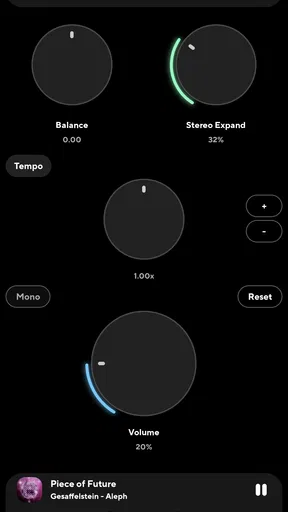
My practical advice is to get the sound close to your own preference, then leave the equalizer alone during casual shared use. If someone wants to make a temporary change, it is worth checking the sound again afterward instead of blaming a track or headphones for a setting that has shifted. This is especially helpful when the device moves between speakers, earbuds, and a car connection, since each listening setup can make the same adjustment feel different.
Poweramp is free to download, with in-app purchases priced from $0.49 to $8.99 per item. I would try the everyday browsing and playback routine before paying for anything: decide whether you actually use the extra flexibility enough to justify a purchase. That is a more useful test than buying simply because a long feature list sounds impressive. The app is rated for Everyone, but that age label is not a substitute for an adult deciding which device, music, and purchases are appropriate for a child.
Where it fits among music apps
If you mainly want a straightforward way to play an existing music library, this is a more hands-on alternative to a basic preinstalled player. Compared with a streaming app, its appeal is the attention it gives to local listening and sound adjustment, not a promise of access to a larger online catalog. Someone who wants recommendations, shared online playlists, or a listening identity that follows them from device to device may be happier with a streaming service instead.
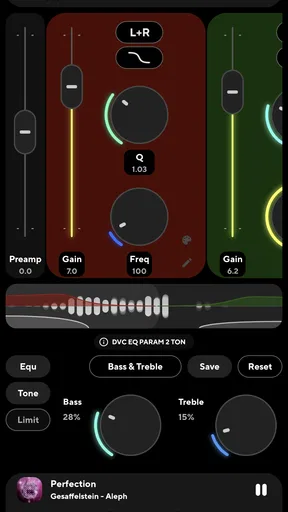
There is also a trade-off in that control. An equalizer is valuable when a pair of headphones sounds too bass-heavy or a recording feels thin, but it can make a track less balanced if you change several bands without listening carefully. I prefer small adjustments and a quick comparison with the original sound. That way, the tool helps solve a real listening problem rather than turning every song into an experiment.
Poweramp has an average rating of around 4.1 from about 1.4 million ratings, and it has been installed over 50 million times. Those figures suggest that it is a well-established choice, but popularity does not tell you whether its controls suit your habits. I would focus on whether you enjoy browsing your own collection, want more control over playback, and are comfortable spending a little time learning the interface.
Ever found yourself stuck in a rut with your default music player, wishing for something that truly brings your tunes to life? Well, let me introduce you to Poweramp Music Player, the app that might just become your new best friend when it comes to jamming out on the go.
Cranking Up the Sound
First off, let's talk about what truly sets Poweramp Music Player apart from the crowd: the sound quality. I mean, once you play your favorite track through this app, you'll feel like you're living in a whole new acoustic universe. The app supports a wide range of formats, so whether you're an MP3 loyalist or a FLAC aficionado, Poweramp has got you covered.
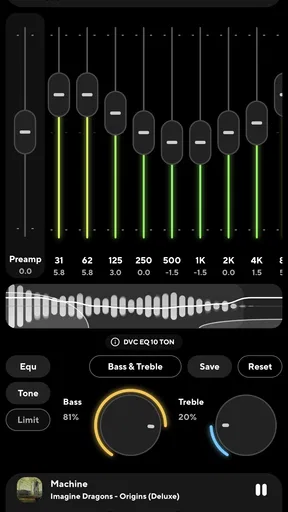
The equalizer is where the magic really happens. It comes with a 10-band graphic equalizer, and for those of us who love to tinker, this is a playground. You can adjust the sound to your liking, creating a personalized audio experience that's as unique as your taste in music.
Interface and Usability
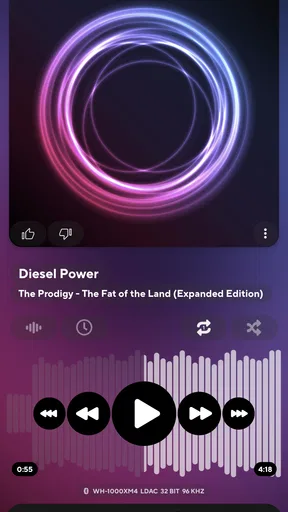
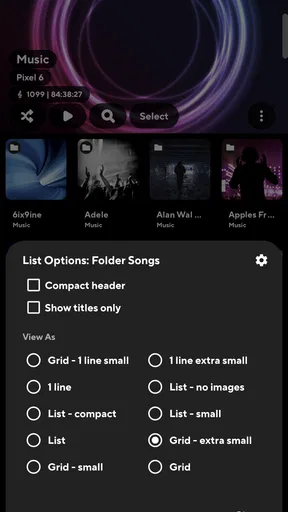
Now, I get it; sometimes, with all these features, apps can become overwhelming. However, Poweramp manages to keep things simple and user-friendly. The interface is sleek and intuitive, making it easy to navigate through your library, create playlists, and enjoy your music without any hassle.
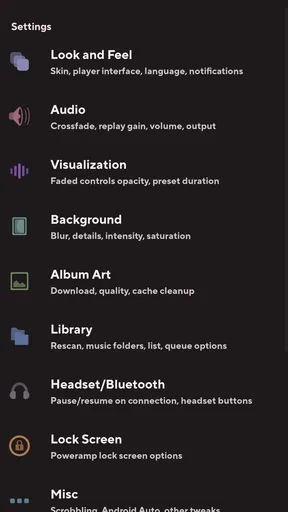
Plus, the customization options are a dream. You can choose from various themes and layouts, giving your player a look that matches your style. It’s not just about the sound; it’s about the whole experience.
Features Galore
One of the things I love about Poweramp is its feature-rich environment. Here are a few highlights:
- Gapless Playback: Perfect for those live albums and mixes where you don’t want any interruptions.
- Crossfade: Keep your party going with smooth transitions between tracks.
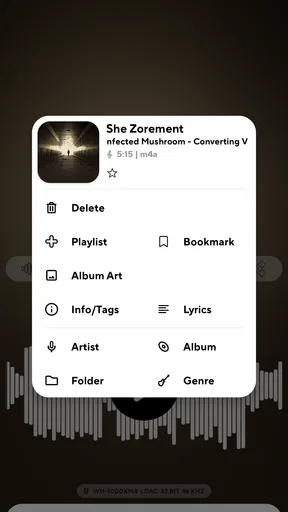
- Tag Editor: For the neat freaks who love having every track properly labeled.
- Widgets and Lock Screen Options: Control your music effortlessly from anywhere on your device.
And let's not forget the always handy sleep timer, ensuring you can drift off to dreamland with your tunes playing softly in the background.
Performance and Compatibility
Poweramp is not just about features; it’s a powerhouse when it comes to performance. The app runs smoothly without any hiccups, even when you're multitasking. Whether you're running it on the latest smartphone or a slightly older model, Poweramp keeps the music flowing without a hitch.
Compatibility is another strong suit. Poweramp works seamlessly across Android devices, and its continuous updates ensure that it keeps up with the latest tech trends and device capabilities.
Trying it in your routine
The most useful way to evaluate a player like this is to use it during the parts of your day when you already reach for music. On a commute, I would build a short playlist for the trip and use the lock-screen controls rather than repeatedly unlocking the phone. At home, I would let an album play in order and see whether gapless playback makes a difference for live recordings or tracks designed to run together. Those are practical tests; you do not need to change every setting to find out whether the app suits you.
The tag editor is worth approaching carefully. If a song appears under the wrong artist or an album is split into several entries, correcting its tags can make the collection easier to browse later. I would fix a small batch first and check the result before editing a large library, especially if other people rely on the same collection. Good labels help everyone find music, while hurried edits can make browsing more confusing.
Crossfade and gapless playback solve different listening problems. Gapless playback is the one I would try for a live set or a continuous mix where a pause would break the flow. Crossfade is more suited to casual playlists where a softer handoff between separate songs feels pleasant. I would not automatically enable both for every kind of listening: for albums with deliberate silence or sharply defined track starts, a transition effect may change the way the music was meant to sound.
Small controls, useful trade-offs
The sleep timer is a good example of a feature that earns its place through routine rather than novelty. If I listen while winding down, I can set playback to stop instead of leaving music running after I fall asleep. For a shared bedroom or common room, that can also prevent one person’s listening session from carrying on after everyone else is ready for quiet. I would still check the timer before handing the device to someone else, since the next listener may expect playback to continue.
Widgets and lock-screen controls can make frequent listening less fiddly, but they also put playback actions where another person holding the device may see them. On a family device, I would treat that as a convenience rather than a privacy feature: these controls make it easier to pause or skip, not to create individual accounts. For a child borrowing a phone, an adult should decide what the child can access on the device itself instead of relying on the music player to enforce boundaries.
The app is aimed at Android, and the current version is build-1020-bundle-play; it requires Android 5.0 or later. That makes the operating system an easy first check before trying it on an older handset. Poweramp was released on November 1, 2010, so it has been around for a long time, but I would still judge it by how it behaves on the particular device you plan to use. A long history is reassuring context, not a guarantee that every interface preference will suit every listener.
Who will enjoy the extra control
I would recommend it to listeners who keep music on their device, care about how it sounds through different headphones or speakers, and like having playback options within reach. It is also a sensible candidate for someone tidying a collection: playlists and track labels can make a personal library easier to navigate, while the equalizer gives room to compensate for a setup that does not sound quite right out of the box.
It is less compelling if you rarely listen to music saved on your device or prefer an app that handles discovery, recommendations, and streaming as its main job. A listener who wants the same personal library and preferences automatically organized around an online account may find a streaming service more convenient. Likewise, if you want only a play button and a simple list, Poweramp’s tuning and customization options may feel like extra choices rather than a benefit.
For households, the best fit is a device with a clear purpose: a shared music phone, a tablet connected to speakers, or one person’s phone used for group listening. It is not a household-management tool, and I would not expect it to coordinate separate preferences or prevent one user from changing another’s settings. That is not a flaw in a music player; it is simply a boundary worth understanding before choosing it for a shared device.
Its Music & Audio category tells you the broad job, but the day-to-day decision is more specific: do you want to shape playback, or do you want an app to make listening decisions for you? Poweramp leans toward the first. Its value shows up when you choose the track, adjust the sound, and decide how songs should flow, rather than when you want a service to select something new without much input.
Final Thoughts
So, is Poweramp Music Player worth the download? Absolutely. It’s a comprehensive music player that not only enhances your listening experience but also adapts to your personal preferences. Whether you’re a casual listener or a hardcore audiophile, Poweramp offers something for everyone.
With its top-notch sound quality, user-friendly interface, and a plethora of features, Poweramp has firmly secured its spot as one of the best music players available today. So why not give it a spin? You might just find yourself rediscovering your music collection in a whole new way.
Verdict
Strengths of Poweramp Music Player
- High-quality audio output.
- Extensive customization options.
- Supports various audio formats.
- User-friendly interface.
- Frequent updates and improvements.
Limitations of Poweramp Music Player
- Limited free version features.
- Complex settings for beginners.
- No built-in lyrics support.
- Resource-intensive on older devices.
- Subscription required for full access.
Other Releases by Poweramp Software Design (Max MP)
View All
Poweramp Full Version Unlocker
Music & Audio4.2
Similar Picks in This Category
View All
YouTube Music
Google LLC4.4

Samsung Music
Samsung Electronics Co., Ltd.3.8

Spotify: Music and Podcasts
Spotify AB4.3

JioSaavn - Music & Podcasts
Saavn Media Limited4.3

Lark Player:Music Player & MP3
Lark Player Studio - Music, MP3 & Video Player4.6

StarMaker: Sing Karaoke Songs
SKYWORK AI PTE. LTD.4.3
Frequently Asked Questions
What audio formats does Poweramp Music Player support?
Poweramp Music Player supports a wide variety of audio formats, making it a versatile choice for music lovers. It includes support for MP3, AAC, FLAC, WAV, and more. This extensive format support ensures that users can play almost any music file they have, without needing to convert files beforehand.
Is Poweramp Music Player compatible with Android and iOS devices?
Poweramp Music Player is predominantly available for Android devices. It offers a robust experience with a focus on Android's capabilities. As of now, there isn't an official iOS version available, so iOS users will need to look for alternative music players compatible with their devices.
What are the key features of Poweramp Music Player?
Poweramp Music Player boasts a range of features, including a powerful equalizer, gapless playback, and support for high-resolution audio. It also offers customizable themes, visualizations, and widgets, giving users the ability to personalize their listening experience. These features make it a favorite among audiophiles.
Does Poweramp Music Player offer a free version?
Poweramp Music Player offers a trial version that allows users to test the app's features for a limited time. After the trial period, users will need to purchase the full version to continue enjoying all the app’s capabilities. This trial provides a good opportunity to see if the app meets your needs before purchasing.
How user-friendly is Poweramp Music Player for beginners?
Poweramp Music Player is designed with both beginners and advanced users in mind. Its interface is intuitive, allowing newcomers to navigate easily. However, with its extensive features and customization options, advanced users can dive deeper into the settings to tailor their experience. The app strikes a balance between usability and advanced functionality.
